GPUSurf and Ogre::GPGPU

June 23rd, 2010 by Henri 3 comments »

In this post I’d like to introduce my GPU-Surf implementation and a new library for Ogre3D Ogre::GPGPU.

What is GPUSurf ?

It is a GPU accelerated version of Surf algorithm based on a paper of Nico Cornelis1.
This version is using GPGPU technique (pixel shader) and Cuda for computing. The Cuda part was done using my Ogre::Cuda library and the GPGPU part was done using a new library called Ogre::GPGPU. This new library is just a little helper that hide the fact that GPGPU computing is done using quad rendering.
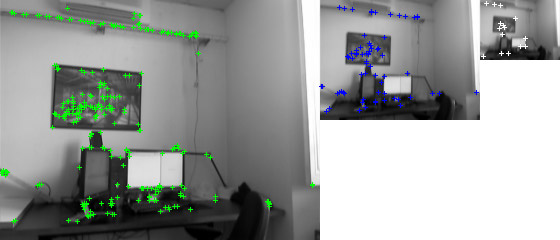
Screenshot of my GPU-Surf implementation (3 octaves displayed)

GPU-Surf could be used to help panoramic image creation, create tracking algorithm, speed-up structure from motion… I’m currently using SiftGPU to speed-up image matching step of structure from motion tools (bundler), but SiftGPU v360 as a memory issue (it’s eating a lot of virtual memory, your program as to be 64bit to bypass common 32bit application limitation: 2Go of virtual memory under windows), and Sift matching is more expensive than Surf (descriptor of 128 float vs 64 for Surf). That’s why I have decided to create my own implementation of GPU-Surf.

Structure from motion using PhotoSynth

Implementation details:

The current version of my implementation of GPU-Surf is uncomplete (descriptor missing, only detector is available). You’ll get all information about license (MIT), svn repository, demo (GPUSurfDemo1.zip) and documentation on the GPUSurf page.

[1]: N. Cornelis, L. Van Gool: Fast Scale Invariant Feature Detection and Matching on Programmable Graphics Hardware (ncorneli_cvpr2008.pdf).


Share

Ogre::Canvas, a 2D API for Ogre3D

June 20th, 2010 by Henri 1 comment »

In my previous post I have announced Ogre::Canvas but It wasn’t available for download.
Now I have released the source code of Ogre::Canvas and some demo.

What is Ogre::Canvas ?

It is a new 2D API for Ogre3D that is based on the Html5 Canvas specifications. I have chosen this API because it is easy to understand, has a lot of cool demos, and it’s easy to prototype in browser using javascript. But you could be asking: what the point of having fast prototyping in a web browser if you’ll have to translate everything in C++ ? This is why I have also implemented Ogre::CanvasV8: a javascript binding for Ogre::Canvas using V8 the javascript engine of Google Chrome. That means that your prototype written in javascript for a browser will run in Ogre::CanvasV8 (with minor tweaks). The three Canvas demos belows are all working using Ogre::CanvasV8, grab OgreCanvasDemos1.zip and try yourself !

Tutorials from MDC Clocks Canvascape

What could I do with Ogre::Canvas ?

Well, it’s a 2D API, so you get a context on which you can execute drawing calls:

  • Transformation: scale, rotate, …
  • Image drawing: drawImage
  • Line styles: lineWidth, lineCap, …
  • Colors, styles and shadows: strokeStyle, fillStyle, …
  • Paths: moveTo, lineTo, arc, …
  • Text: fillText, strokeText, …
  • If you need a full overview of the Html5 Canvas API, grab the excellent Cheat Sheet.

You could create really complex UI element using Canvas. If you need an example of what you could create using this, take a look at the timeline I have created for a multitouch prototype. In fact it is because I got poor performance using Awesomium that I have decided to create this library. Awesomium is really a good product but integrating a full web page is overkill if you are only interested by a 2D Canvas tag…

What is the development status ?

It is not really “production ready”, I still have some issues with drawing images with alpha channels… You’ll get all information about license (MIT), svn repository and documentation on the Ogre::Canvas page.

Share

Ogre::OpenCL and Ogre::Canvas

May 9th, 2010 by Henri 2 comments »

This is a short post to show stuff I’m working on. After announcing Ogre::Cuda to the Ogre Community I have realized that OpenCL could interest more people… Although I never get a chance to play with OpenCL I have created another library very similar to Ogre::Cuda but this time for OpenCL. Ogre::OpenCL is still in a very experimental stage but you can grab it from my google code or get more information from the demo page. I’m also wondering if I could create another library that would help GPGPU in Ogre3D. Indeed GPGPU computation is not that easy to setup, you have to :

  • create RenderTarget texture
  • desactivate auto update on the render target
  • add a viewport with a camera
  • add a compositor to the viewport
  • add a listener to the compositor (optional)
  • manualy call update() to do the computation

That’s why I was thinking in creating a library to do all this things in a more user friendly manner, will see …

I also have decided to anounce Ogre::Canvas. This is my Html5 canvas API implementation for Ogre3D. In short, you get a Canvas context on which you can call standard 2D functions (lineTo, moveTo, fill, stroke, …) and once you want an update, the Canvas context is uploaded to an Ogre::Texture. Furthermore, I have implemented a Javascript binding using V8 that is identical to the Html5 Canvas specification. So the same javascript code used in browser can be executed by Ogre::Canvas (with minor tweaks). You’ll get more information on the demo page.

And I have finally managed to translate my resume in English.

Share

Cuda integration with Ogre3D

April 26th, 2010 by Henri 1 comment »

If you already start to play with Cuda you know that graphic interop is not an easy task. Indeed you need to register graphic ressources using different methods accordings to the Ogre::RenderSytem (DX9, DX10, GL). As Ogre3D main objective is to hide DirectX and OpenGL “specificities”,  I have decided to create a tiny lib for Ogre3D to help registering and mapping ressources for Cuda. This tiny lib, named Ogre::Cuda, helps registering Ogre::Texture and Ogre::HardwareVertexBuffer for Cuda.

This video is just a very basic example showing an integration of two Cuda samples inside Ogre3D. The vertex buffer and the 2D texture cuda kernels are part of the Nvidia GPU Computing SDK.

This library is in beta stage, there is still room for improvement, but the base are settled for a cross-platform and cross-graphics API way to use Cuda thanks to Ogre3D.

Source code and binary demo available on the demo page.

Utilisation example :

Ogre::TexturePtr texture;
Ogre::Cuda::Root* mCudaRoot = Ogre::Cuda::Root::createRoot(renderWindow, renderSystem);
mCudaRoot->init();
Ogre::Cuda::Texture* mCudaTex;
mCudaTex = mCudaRoot->getTextureManager()->createTexture(texture);
//init
mCudaTex->registerForCudaUse();
//on each Cuda update
mCudaTex->map();
Ogre::Cuda::TextureDeviceHandle textureHandle;
textureHandle = mCudaTex->getDeviceHandle(0, 0);
cudaFunction(textureHandle->getPointer());
mCudaTex->update(textureHandle); //reflect changes to the Ogre::Texture
mCudaTex->unmap();
//shutdown
mCudaTex->unregister();
mCudaRoot->shutdown();
Share

Multitouch prototype done using Awesomium and Ogre3D

April 9th, 2010 by Henri 2 comments »

I just want to present a 3-years prototype done by my company with Ogre3D. I have designed the GUI and the spatio-temporal request manager.

Designing the GUI was particularly challenging because the timeline needs to handle multitouch gesture. I have chosen Awesomium to realize this timeline. The main reason was that I was very familiar with javascript prototyping and HTML5 canvas. I manage to create this timeline with Awesomium, but it turns out to be very hacky because javascript performance were very poor. See yourself on this demo page (working with Google Chrome, Opera 10.51 and maybe with Firefox 3.6).

The timeline was designed with a simple idea : all the gesture recognition are handle by a C++ Layer. Then the cursors events are translated into javascript function calls and the function are executed by the webpage. The main issue was that canvas drawing was slow and I was receiving cursors events every frame (meaning : the timeline needs a graphical update each frame). I finally found a solution to reduce timeline rendering to 25fps. The code can be found bellow :

var Interface = new function() {
   var _that  = this;
   var _rendering = false;
   var _skippedRenderingTime = new Date();
   this.TimeLine = new function() {
      this.render = function() {
         if (!_rendering) {
            _rendering = true;
            TimeLine.render();
            setTimeout(function() {
               _rendering = false;
               if ((new Date() - _skippedRenderingTime) < 45) {
                  _that.TimeLine.render();
               }
            }, 40); //25fps
         }
         else {
            _skippedRenderingTime = new Date();
         }
      };
   };
}
var TimeLine = new function() {
   this.render = function() {
      //do heavy canvas drawing
   };
};

The function “Interface.TimeLine.render();” is called each time the C++ needs a graphical update, but the javascript delay the rendering if it’s exceeds 25fps. It’s kinda hacky but the result is working properly.

Share