Photorealistic mesh created with PhotoSynthToolkit

February 4th, 2011 by Henri 7 comments »

I’ve updated the PhotoSynthToolkit, it now integrates the CameraExport 3DS Max script created by Josh Harle. I’ve converted his code from C# to C++ with his approval, so the 3DS Max script is now generated directly when you download a Synth with my PhotoSynthDownloader. So now you’ll find a “cameras.ms” file in the “bin” folder. In the video just below you’ll see the difference between the rendering using only vertex color and the one using texture projection:

For 3DS Max beginner like me, this is how I have setup the rendering:

  • add path to your synth: Customize -> Configure User Paths -> External Files -> add Path to your pmvs\visualize folder
  • when importing the obj file be sure to uncheck Flip ZY-axis
  • change environment global lighting: Rendering -> Environment -> Global Lighting: level 0.0, Ambient white

As usual the new toolkit his available on his dedicated page.

 
Share

SFMToolkit updated

January 29th, 2011 by Henri 5 comments »

This is a very short post to announce a SFMToolkit bug fix… If the toolkit wasn’t working at all on your machine (File not found error in “1 – Bundle.wsf”) this may fix the issue. The bug was linked to the Windows separator setting: ‘.‘ or ‘,‘. Thus the default 0.8 matching threshold was on some system applied as 0: no matching -> no bundler output :-(

I’ve also fixed other errors in BundlerMatcher too (small memory leak + no more 4096 match limit), so you should download this version too even if the previous version was working on your system. The new version is available on his dedicated page: please do not make direct link to the zip file but to this page so people downloading will always get the latest version.

Share

Ogre3D PhotoSynth Viewer

January 26th, 2011 by Henri 7 comments »

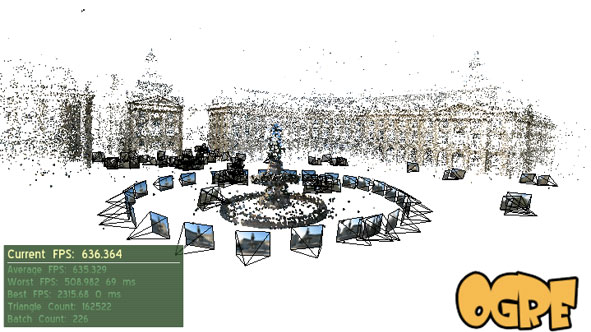
This viewer is now integrated with the new version of my PhotoSynthToolkit (v5). This toolkit allow you to download synth point cloud and thumbnails pictures. You can also densify the sparse point cloud generated by PhotoSynth using PMVS2 and then create great accurate mesh using MeshLab.

New feature of PhotoSynthToolkit v5:

  • Thumbnails downloading should be faster (8x)
  • New C++ HD picture downloader (download tiles and re-compose them)
  • Tools to generate “vis.dat” from previous PMVS2 call (analysing .patch file)
  • Working Ogre3D PhotoSynth viewer:
    • Can read dense point cloud created with my PhotoSynthToolkit using PMVS2
    • Click on a picture to change camera viewpoint
    • No-roll camera system

Warning: the PhotoSynth viewer may need a very powerful GPU (depending on the synth complexity: point cloud size and number of thumbnails). I’ve currently tested a scene with 820 pictures and 900k vertices on a Nvidia 8800 GTX with 768mo and it was working at 25fps (75fps with a 470 GTX and 1280mo). I wish I could have used Microsoft Seadragon :-) .

Download:

The PhotoSynthToolkit v5 is available on his dedicated page, please do not make direct link to the zip file but to this page instead. So people willing to download the toolkit will always get the latest version.

Video demo:

Future version

Josh Harle has created CameraExport: a solution for 3DS Max that enable to render the picture of the Synth using camera projection. I don’t have tested it yet but I’ll try to generate a file compatible with his 3DS Max script directly from my toolkit, thus avoiding to download the Synth again using a modified version of SynthExport. Josh has also created a very interesting tutorial on how to use mask with PMVS2:

Masks with the PhotoSynth Toolkit 4 – tutorial from Josh Harle on Vimeo.

Share

2010 visual experiments

January 7th, 2011 by Henri 6 comments »

Happy new year everyone!

2010 was a year full of visual experiments for me, I hope that you like what you see on this blog. In this post I’m making a little overview of all visual experiments created by me during this year. This is an opportunity to catch-up something you’ve missed! I’d like also to thanks some person that have been helping me too:

Visual experiments created in 2010:

During this year I have added some features to Ogre3D:

  • ArToolKitPlus: augmented reality marker-based system
  • Cuda: for beginner only (at least advanced user could grab some useful code)
  • OpenCL: for beginner only (at least advanced user could grab some useful code)
  • Html5 Canvas: implementation based on skia for graphics and V8 for javascript scripting
  • Kinect: this is a very hacky solution, I’ll improve it later

I also have learned GPGPU programming by myself while coding a partial GPUSurf implementation based on Nico Cornelis paper. But this implementation is not complete and I’m willing to rewrite it with a GPGPU framework based on OpenGL and CG only (not Ogre3D). With such a framework writing Sift/Surf detector should be easier and more efficient.

I have created some visual experiments related to Augmented Reality:

My outdoor 3D tracking algorithm for augmented reality needs an accurate point cloud: this is why I’m interested in structure from motion and I’ve created two SfM toolkit:

Posts published in 2010:

Share

Outdoor tracking using panoramic image

December 22nd, 2010 by Henri 6 comments »

I have made this experiment in 2 days:

First of all, I must admit that this is more a “proof-of-concept” rather than a prototype… But the goal was to illustrate a concept needed for my job. I love this kind of challenge! Building something like this in 2 days was only possible thanks to great open-source library:

Analysis

I’m using a panoramic image as reference. For each frame of the video I’m extracting Sift feature using SiftGPU and matching them with those of the reference image. Then I’m computing the homography between the 2 images using Ransac homography estimator (OpenCV cvFindHomography).

Performance

The performance are low due to complexity of the Sift detection and matching and that I’m applying the homography using cvWarpPerspective.

Sift extraction: 28ms 1228 features
Sift matching: 17ms using SiftGPU
Ransac Homography estimation: 2ms 89 inliers of 208 matches
Homography application: 36ms done on the CPU with OpenCV
Global: 12fps
 

I’m working on another version using Fast (or Agast) as feature detector and Brief as descriptor. This should lead to a significant speed-up and may eventually run on a mobile… Using the GPU vertex and pixel shader instead of the CPU to apply the homography should also gives a nice speed-up.

I’m also aware that it is not correct to apply an homography on a cylindric panoramic image (especially if you don’t undistort the input video frame too ;) )

Share